“
— In-game description
Select Decoration is used to open a decoration palette panel to display available guild hall or homestead decorations to be placed.
Mechanics[edit]
|
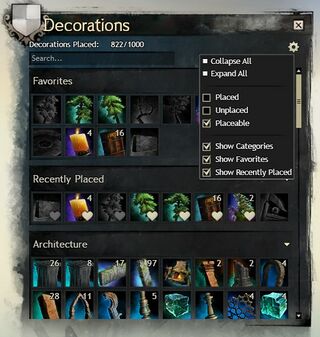
Once this skill is used, the decoration palette panel will open, displaying the following information:
- Decorations Placed: — Show placed decorations count.
- Search box — Used for searching decorations by name.
 Options : Options :
- Collapse All — an option button to collapse all opened category tabs.
- Expand All — an option button to expand all closed category tabs.
- Placed — a checkbox to show only decorations that already used.
- Unplaced — a checkbox to show only decorations that not already used.
- Placeable — a checkbox to show only decorations that ready to place if checked or show all decorations if unchecked.
- Show Categories — a checkbox to show or hide category tabs.
- Show Favorites — a checkbox to show or hide favorites tabs.
- Show Recently Placed — a checkbox to show or hide recently placed tabs.
- Dropdown tabs
- Favorites — Displays a list of favorited decorations. A decoration can be added to the list by right-clicking its icon. Favorited decorations are marked with a heart icon.
- Recently Placed — Displays a list of the most recently placed decorations.
- <Decoration category> — Displays decorations grouped by category.
|
- Some of future decorations can be viewed through the Decoration Palette panel if Options > Placeable is unchecked.




