Character selection screen
The Character selection screen is the first screen that appears when starting the game after the login screen. Here the player can choose to play, create or delete a character, as well as see character and account-wide progress.
Overview[edit]

- Options and Contacts
- Selected character information:
- Character name
- Level, race and profession
- Represented guild
- Percentage of Central Tyria map completion
- Current location as a zone name
- World
- Log Out button and Region Selection dialogue
- Selected character model preview
- Other character slots:
- Profession or elite specialization
- Level
- Active crafting disciplines
- Other learned disciplines are listed when hovered
- Background image changes by zone
- Account Name
- Account Progression and Achievements
- Play, create and delete a character
Background and soundtrack[edit]
The theme can be changed with the "Character Selection Background" dropdown setting in General Options. A randomized selection can also be made each time the screen is visited. The setting defaults back to the most recent expansion upon their release, currently "Castora" (Visions of Eternity). Each background has a different soundtrack, and alters the lighting/reflections used for the shown character. As the backgrounds consist of multiple layers with animated elements, some are significantly more resource intensive than others.
| # | Name / Release | Background | Soundtrack song(s) | Animated elements | Parallax | Camera environment | GPU usage |
|---|---|---|---|---|---|---|---|
| 7 | Lion's Arch Guild Wars 2 |

|
|
|
0 |
Slightly zoomed in Lighting: Day, backlit Reflection:  Queensdale[1] Queensdale[1] |
Low |
| 1 | Heart of Maguuma Heart of Thorns |

|
|
|
0 |
Lighting: Bright day Reflection: Queensdale |
Low |
| 2 | Crystal Desert Path of Fire |

|
|
|
0 |
Lighting: Night Reflection: Queensdale, tinted orange |
Medium |
| 5 | Cantha End of Dragons |

|
|
|
1 |
Lighting: Day Reflection: Daigo Ward |
Medium |
| 3 | Horn of Maguuma Secrets of the Obscure |

|
|
|
1 |
Lighting: Dusk Reflection: Spire's Heart |
High |
| 6 | Janthir Wilds Janthir Wilds |

|
|
|
1 |
Lighting: Day Reflection: Timberland Holt |
Very High |
| 4 | Castora Visions of Eternity |

|
|
|
1 |
Lighting: Night Reflection:  Studio light Studio light |
Very High |

Character icon backgrounds[edit]


Gallery[edit]
- Historical UI
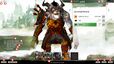
Before the Guild Wars 2: Heart of Thorns expansion
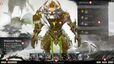
Before the Guild Wars 2: Path of Fire expansion
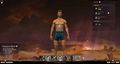
Before the Guild Wars 2: End of Dragons expansion
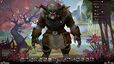
Before the Guild Wars 2: Secrets of the Obscure expansion
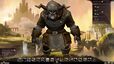
Before the Guild Wars 2: Janthir Wilds expansion
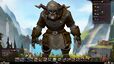
Before the Guild Wars 2: Visions of Eternity expansion


- Beta characters

Path of Fire beta character tag.

End of Dragons beta character tag.

Beta character tag from Weaponmaster Training onward.

Watermark in the character information area of beta characters from the Weaponmaster Training beta onward.


.png)

Notes[edit]
- Equipped weapons, back items, and cosmetic auras (infusions) are not shown.
Version history[edit]
| Patch | Changes |
|---|---|
| January 28, 2025 |
|
| April 16, 2024 |
|
| November 07, 2023 |
|
| June 29, 2023 |
|
| October 04, 2022 |
|
| November 30, 2021 |
|
| August 28, 2018 |
|
| September 22, 2017 | Path of Fire release:
|
| April 18, 2017 |
|
| May 03, 2016 |
|
| October 23, 2015 | Heart of Thorns release:
|


